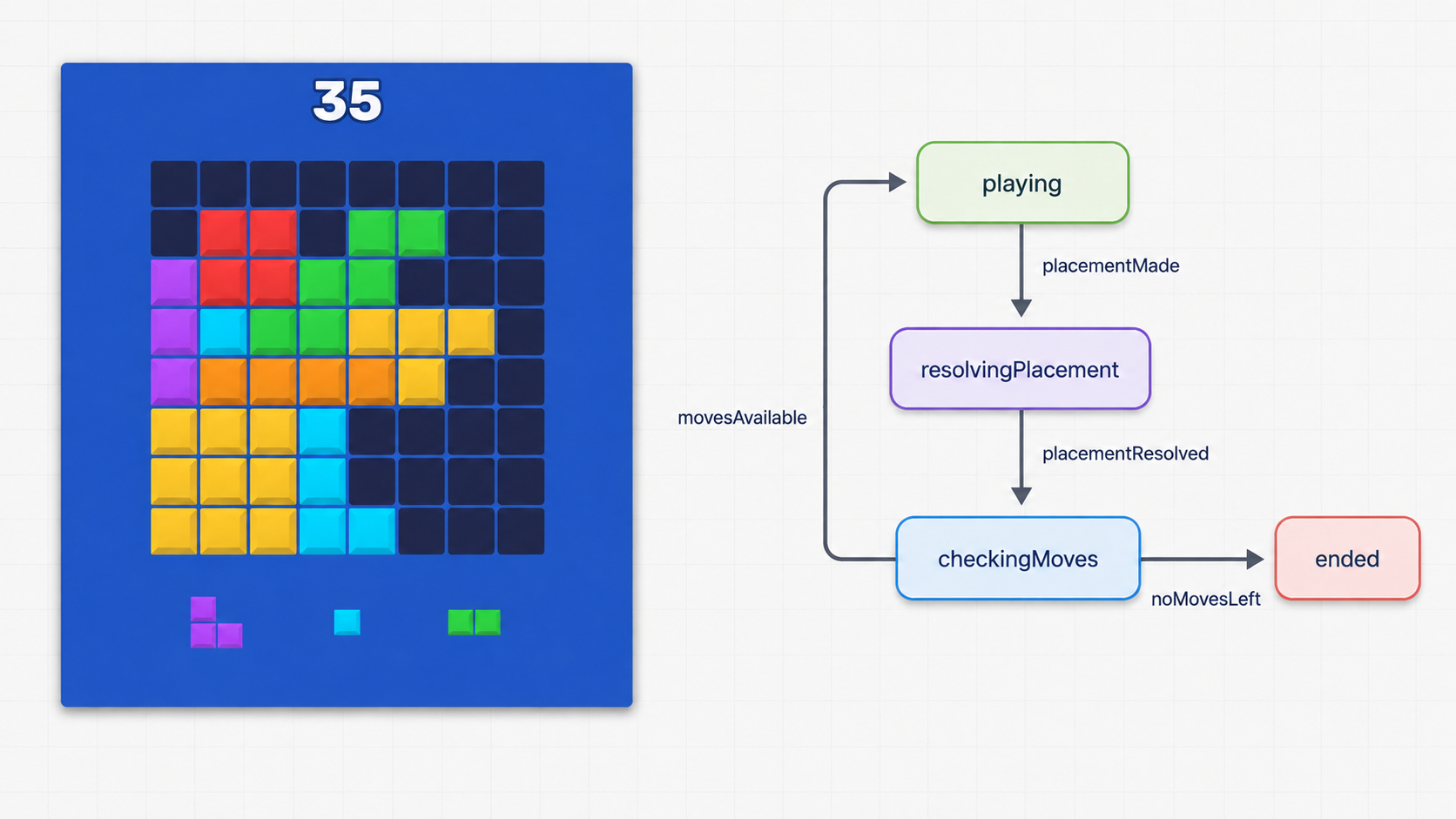
This article shows how I manage scene flow through an FSM in @gamedevland/engine, using startup, placement, move validation, game over, and restart from Block Puzzle.
What Is an FSM?
FSM stands for Finite State Machine.
An FSM stores the current state of a system and describes what should happen when a new event arrives.
In Block Puzzle, PlacementRequested moves the scene from playing to resolvingPlacement.
FSM Elements
Finite means that the set of states is defined in advance. The FSM config becomes a complete map of allowed transitions.
Why a Game Scene Needs an FSM
Without an FSM, scene state usually ends up spread across components and flags: whether a shape can be dragged, whether placement is being resolved, whether the game has ended, and whether restart is available.
Flags are not the problem; scattered transition rules are.
The FSM manages flow. Game rules, layout mutations, and score calculation stay elsewhere.
Connecting the FSM to a Scene
The Block Puzzle scene class is one line:
import { FsmDrivenScene } from '@gamedevland/engine/scenes';

export class GameScene extends FsmDrivenScene {}
I keep scene classes empty and distribute logic by responsibility:
In my SDK, FsmDrivenScene connects the scene lifecycle to its FSM. After layout, scene DI, and scene services are ready, it dispatches SceneReady. While the scene is active, it also dispatches SceneTick.
The FSM configuration is attached in the scene definition:
export class GameSceneDefinition {
  static readonly config: SceneConfig = {
    key: 'game',
    useClass: GameScene,
    layout: 'json/layouts/scenes/game/layout.json',
    fsm: GameFsm.config,
  };
}
Who Changes the State?
The FSM changes its own state. A component or service does not tell it which state to enter. They emit an event describing an intent or a result.
Events follow this order:
- A component or service emits an event; the SDK dispatches lifecycle events directly.
- The event bridge forwards game events to the active
SceneFSM. - The FSM finds a transition and runs its
actionssequentially. - It sets
targetand runs the new state’sentryactions.
If an event has no transition in the current state, the FSM does nothing with it. PlacementRequested, for example, starts placement only while the scene is in playing.
Why a Component Should Not Switch Scene State
SceneFSM does not expose a switchState() method. Components report intent; the FSM config selects the route.
switchState('resolvingPlacement')
PlacementRequested
→
SceneFSM
This keeps scene flow out of visual components:
- transitions stay in one config and can be state-dependent;
- transition actions, entry actions, and async commands keep their execution order;
- changing scene flow does not require rewriting components.
An event does not have to change state. If a transition has actions but no target, the FSM runs the commands and stays in the current state. Block Puzzle handles RestartRequested this way.
Not Every State Belongs to the Scene FSM
A component can have its own local state. BlockPuzzleDragComponent, for example, stores the current phase of its drag interaction:
type DragPhase = 'dragging' | 'snapping' | 'returning';

interface DragSession extends DragSelection {
  readonly shape: ShapeDefinition;
  preview: PlacementPreview;
  phase: DragPhase;
}These phases affect only the drag component, so they do not belong in the scene FSM.
The Scene State Map
Block Puzzle uses six states. This diagram is the complete scene flow implemented by the code in the following sections:
The next three sections follow the map from top to bottom. The fourth shows how the flow is wired:
Starting the Game Session
When the scene is ready, FsmDrivenScene dispatches SceneReady. The FSM runs two commands and targets starting:
bootstrapping: {
  on: {
    [FsmDrivenSceneLifecycleEvents.SceneReady]: {
      target: 'starting',
      actions: [
        'StartBlockPuzzleSessionCommand',
        'StartBlockPuzzleMusicCommand',
      ],
    },
  },
},
starting: {
  on: {
    [BlockPuzzleEvents.SessionStarted]: {
      target: 'playing',
    },
  },
},
Commands in actions run through CommandBus in strict order. If a command returns a Promise, the FSM waits before starting the next command.
After both commands finish, the FSM sets the state to starting. SessionStarted, emitted while the session was created, is already waiting in the queue and becomes the next transition to playing.
The command itself stays small. It resolves the scene service from DI and calls one use case:
StartBlockPuzzleSessionCommand.ts ↗
export class StartBlockPuzzleSessionCommand extends BaseCommand {
  override run(): void {
    this.getSceneService(BlockPuzzleServices.Gameplay).startSession();
  }
}
BlockPuzzleGameplayService creates the runtime session, emits initial data for visual components, and reports that startup has completed:
BlockPuzzleGameplayService.ts ↗
startSession(): void {
  const deck = new BlockPuzzleShapeDeck(this.shapesConfig.shapes);
  const slots = new BlockPuzzleSlots();
  slots.replace(deck.draw(BlockPuzzleSlots.Count));
  const progress = this.progress.load();

  this.session = {
    board: new BlockPuzzleBoard(this.boardConfig.width, this.boardConfig.height),
    deck,
    slots,
    score: 0,
    bestScore: progress.bestScore,
    ended: false,
  };
  this.emitBoardChanged();
  this.emitBlocksChanged();
  this.emitScoreChanged(0);
  this.sceneContext.engine.events.emit({
    type: BlockPuzzleEvents.SessionStarted,
    data: {},
  });
}
Placing a Block
1. The Component Emits a Request
BlockPuzzleDragComponent owns input, preview, and visual movement. After the snap animation, it does not modify the board directly. It emits an event:
this.clearPreview();
this.node.events.emit({
  type: BlockPuzzleEvents.PlacementRequested,
  data: {
    slotId: drag.slotId,
    anchor,
  },
});
2. The FSM Selects the Scenario
The FSM handles the request in playing:
playing: {
  on: {
    [BlockPuzzleEvents.PlacementRequested]: {
      target: 'resolvingPlacement',
      actions: ['PlaceBlockCommand'],
    },
    [BlockPuzzleEvents.RestartRequested]: {
      actions: ['RestartBlockPuzzleCommand'],
    },
  },
},
PlacementRequested is handled only in playing, so there is no separate isPlacementLocked flag. The FSM runs PlaceBlockCommand, changes the state to resolvingPlacement, and then handles the queued result event.
3. The Command Validates Its Input
PlaceBlockCommand extends BaseTypedCommand:
type PlaceBlockCommandPayload = InferDecoded<
  typeof BlockPuzzleEventSchemas.PlacementRequest
>;

export class PlaceBlockCommand extends BaseTypedCommand<PlaceBlockCommandPayload> {
  protected override readonly inputDecoder =
    BlockPuzzleEventSchemas.PlacementRequest;

  protected override execute(payload: PlaceBlockCommandPayload): void {
    this.getSceneService(BlockPuzzleServices.Gameplay).place(payload);
  }
}
The payload schema lives with the other game event contracts:
static readonly PlacementRequest = SchemaDecoder.object({
  slotId: SchemaDecoder.number({
    integer: true,
    min: 0,
    max: BlockPuzzleSlots.Count - 1,
  }),
  anchor: BlockPuzzleEventSchemas.Cell,
});
The SDK decodes the event payload before execute runs. InferDecoded derives the TypeScript type from the same schema, so runtime validation and static typing cannot drift apart.
4. The Scene Service Updates the Session
BlockPuzzleGameplayService owns the current session:
BlockPuzzleGameplayService.ts ↗
interface BlockPuzzleSession {
  readonly board: BlockPuzzleBoard;
  readonly deck: BlockPuzzleShapeDeck;
  readonly slots: BlockPuzzleSlots;
  score: number;
  bestScore: number;
  ended: boolean;
}
The service coordinates one complete move: it reads the shape from its slot, calls board domain methods, clears completed lines, calculates score, and emits the result. The actual rules remain in focused domain classes.
Placement validity belongs to BlockPuzzleBoard:
canPlace(shape: ShapeDefinition, anchor: CellCoordinate): boolean {
  return shape.cells.every((cell) => {
    const target = this.resolveTarget(anchor, cell);
    return this.isInside(target) && this.readCell(target) === null;
  });
}
Score calculation belongs to BlockPuzzleScoreRules:
calculate(placedCellCount: number, clearedLineCount: number): number {
  const placementPoints = placedCellCount * this.config.pointsPerPlacedCell;
  const linePoints = clearedLineCount * this.config.pointsPerClearedLine;
  const multiLineBonus = clearedLineCount >= 2 ? this.config.multiLineBonus : 0;
  return placementPoints + linePoints + multiLineBonus;
}
The FSM manages execution order, the command delegates the use case, and the domain model owns the rules.
5. The Result Selects the Next State
The service emits PlacementCompleted or PlacementRejected, and the FSM declares both branches:
resolvingPlacement: {
  on: {
    [BlockPuzzleEvents.PlacementCompleted]: {
      target: 'checkingMoves',
    },
    [BlockPuzzleEvents.PlacementRejected]: {
      target: 'playing',
    },
    [BlockPuzzleEvents.RestartRequested]: {
      actions: ['RestartBlockPuzzleCommand'],
    },
  },
},
Entry Actions and Branching
After every successful move, the game must check whether another placement is available. This should run each time the FSM enters checkingMoves, so it is declared as an entry action:
checkingMoves: {
  entry: ['CheckBlockPuzzleMovesCommand'],
  on: {
    [BlockPuzzleEvents.MovesAvailable]: {
      target: 'playing',
    },
    [BlockPuzzleEvents.GameOver]: {
      target: 'ended',
      actions: ['HandleBlockPuzzleGameOverCommand'],
    },
    [BlockPuzzleEvents.RestartRequested]: {
      actions: ['RestartBlockPuzzleCommand'],
    },
  },
},
The command contains one step:
CheckBlockPuzzleMovesCommand.ts ↗
export class CheckBlockPuzzleMovesCommand extends BaseCommand {
  override run(): void {
    this.getSceneService(BlockPuzzleServices.Gameplay).emitMoveAvailability();
  }
}
The service queries the domain model and emits the result:
BlockPuzzleGameplayService.ts ↗
emitMoveAvailability(): void {
  this.sceneContext.engine.events.emit({
    type: this.hasAvailableMove()
      ? BlockPuzzleEvents.MovesAvailable
      : BlockPuzzleEvents.GameOver,
    data: {},
  });
}
There is no if (hasAvailableMove()) inside the FSM. It receives a completed result - MovesAvailable or GameOver - and selects the corresponding transition.
Registering Commands and Scene Services
The FSM refers to commands by name, so each command must be registered in global DI:
protected override registerCommands(group: CommandsGroup): void {
  group
    .add('CheckBlockPuzzleMovesCommand', CheckBlockPuzzleMovesCommand)
    .add('FailBootPreloadCommand', FailBootPreloadCommand)
    .add('HandleBlockPuzzleGameOverCommand', HandleBlockPuzzleGameOverCommand)
    .add('OpenGameSceneCommand', OpenGameSceneCommand)
    .add('PreloadBootResourcesCommand', PreloadBootResourcesCommand)
    .add('PlaceBlockCommand', PlaceBlockCommand)
    .add('RestartBlockPuzzleCommand', RestartBlockPuzzleCommand)
    .add('StartBlockPuzzleSessionCommand', StartBlockPuzzleSessionCommand)
    .add('StartBlockPuzzleMusicCommand', StartBlockPuzzleMusicCommand);
}
The gameplay service is registered in the game scene DI scope:
protected override registerServices(services: SceneServiceTokenRegistry): void {
  services
    .add(BlockPuzzleServices.Gameplay)
    .add(BlockPuzzleServices.Audio)
    .add(DebugDiTokens.GameDevtoolsApiService);
}
A scene-scoped service is created when the scene enters and ends with that scene. BlockPuzzleGameplayService.onExit() clears the current session:
BlockPuzzleGameplayService.ts ↗
protected override onExit(): void {
  this.session = undefined;
}
Commands resolve scene services through getSceneService(...). They do not construct services manually or use a global singleton for scene-specific state.
What This Structure Gives Me
These boundaries also make AI-assisted development predictable. I can ask an agent to add an event, transition, and command while keeping rules in the domain and visuals in components. The agent does not have to invent the architecture.
For me, the FSM is an executable map of scene behavior. Command order stays predictable, input data is typed, and the SDK controls the lifecycle.